Merhabalar.
Cihazımda intel ekran kartı + GTX 960M ekran kartı bulunuyor.
Bu konudaki adımları takip ederek
Bumblebee kurulumu yaptım. Sürücü olarak nvidia-370 yazan yerlerin tümünü nvidia-367 olarak yazdım. Sebebi ise ekran kartımdaki
son stabil sürümün bu olduğunu öğrenmem oldu.
Şuanda kurulumda yazan
optirun glxgearsKodunu yazdığımda ekranda çarklar dönüyor ancak; çarkların göründüğü pencereyi kapattığımda terminalde şu tip bir hata mesajı alıyorum.

Ayrıca sadece
glxgearsKodunu yazdığımdada bu tip bir hata geliyor karşıma.

Ayrıca bu normalmi bilmiyorum ancak Bumblebee kurmama rağmen Linux Mint'in görev çubuğuna şu şekilde bir Nvidia simgesi gelmiş durumda:
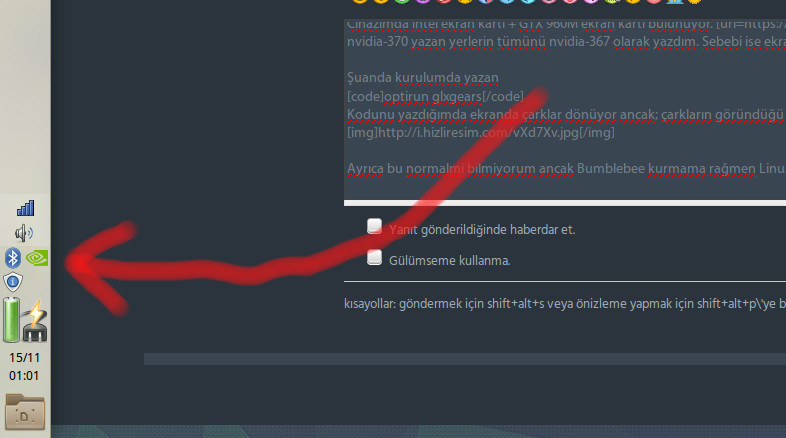
Simgeye tıkladığımda da baya baya Offical nvidia sürücüsü gibi bi denetim masası geliyor karşıma. Bumblebee kurulumunda sonra bunun gelmesi pek normal değil heralde ? Bilemedim sizlere sormak istedim sanırım hata yaptım.
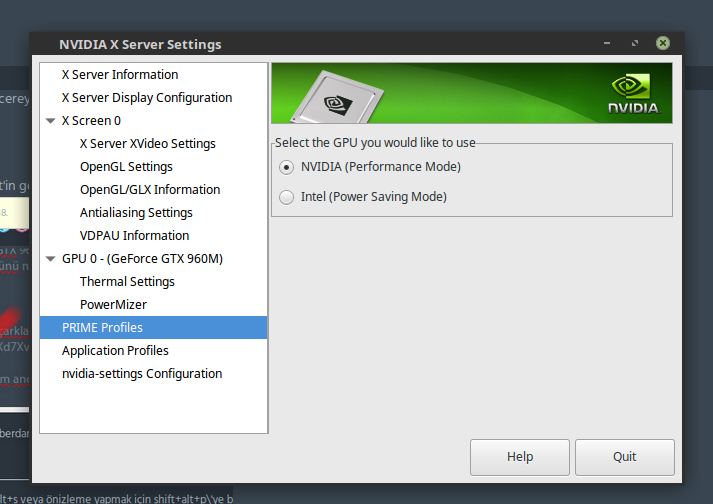
Sorunum bu şekilde, yardımcı olan herkese çok teşekkürler.Ayrıca konuda hata için verilen kodların çıktılarını da paylaşmak isterim. # optirun -vvv glxgears
[ 1646.917193] [DEBUG]Reading file: /etc/bumblebee/bumblebee.conf
[ 1646.917615] [INFO]Configured driver: nvidia
[ 1646.917978] [DEBUG]optirun version 3.2.1 starting...
[ 1646.918003] [DEBUG]Active configuration:
[ 1646.918009] [DEBUG] bumblebeed config file: /etc/bumblebee/bumblebee.conf
[ 1646.918015] [DEBUG] X display: :8
[ 1646.918020] [DEBUG] LD_LIBRARY_PATH: /usr/lib/nvidia-367:/usr/lib32/nvidia-367
[ 1646.918026] [DEBUG] Socket path: /var/run/bumblebee.socket
[ 1646.918031] [DEBUG] Accel/display bridge: auto
[ 1646.918036] [DEBUG] VGL Compression: proxy
[ 1646.918046] [DEBUG] VGLrun extra options:
[ 1646.918054] [DEBUG] Primus LD Path: /usr/lib/x86_64-linux-gnu/primus:/usr/lib/i386-linux-gnu/primus
[ 1646.918128] [DEBUG]Using auto-detected bridge virtualgl
[ 1647.019954] [INFO]Response: Yes. X is active.

[ 1647.019971] [INFO]Running application using virtualgl.
[ 1647.020099] [DEBUG]Process vglrun started, PID 4415.
[VGL] ERROR: in readback--
[VGL]    256: Window has been deleted by window manager
[ 1650.404915] [DEBUG]SIGCHILD received, but wait failed with No child processes
[ 1650.404932] [DEBUG]Socket closed.
[ 1650.404945] [DEBUG]Killing all remaining processes.
# cat /etc/bumblebee/bumblebee.conf
# Configuration file for Bumblebee. Values should **not** be put between quotes

## Server options. Any change made in this section will need a server restart
# to take effect.
[bumblebeed]
# The secondary Xorg server DISPLAY number
VirtualDisplay=:8
# Should the unused Xorg server be kept running? Set this to true if waiting
# for X to be ready is too long and don't need power management at all.
KeepUnusedXServer=false
# The name of the Bumbleblee server group name (GID name)
ServerGroup=bumblebee
# Card power state at exit. Set to false if the card shoud be ON when Bumblebee
# server exits.
TurnCardOffAtExit=false
# The default behavior of '-f' option on optirun. If set to "true", '-f' will
# be ignored.
NoEcoModeOverride=false
# The Driver used by Bumblebee server. If this value is not set (or empty),
# auto-detection is performed. The available drivers are nvidia and nouveau
# (See also the driver-specific sections below)
Driver=nvidia
# Directory with a dummy config file to pass as a -configdir to secondary X
XorgConfDir=/etc/bumblebee/xorg.conf.d
# Xorg binary to run
XorgBinary=/usr/lib/xorg/Xorg

## Client options. Will take effect on the next optirun executed.
[optirun]
# Acceleration/ rendering bridge, possible values are auto, virtualgl and
# primus.
Bridge=auto
# The method used for VirtualGL to transport frames between X servers.
# Possible values are proxy, jpeg, rgb, xv and yuv.
VGLTransport=proxy
# List of paths which are searched for the primus libGL.so.1 when using
# the primus bridge
PrimusLibraryPath=/usr/lib/x86_64-linux-gnu/primus:/usr/lib/i386-linux-gnu/primus
# Should the program run under optirun even if Bumblebee server or nvidia card
# is not available?
AllowFallbackToIGC=false


# Driver-specific settings are grouped under [driver-NAME]. The sections are
# parsed if the Driver setting in [bumblebeed] is set to NAME (or if auto-
# detection resolves to NAME).
# PMMethod: method to use for saving power by disabling the nvidia card, valid
# values are: auto - automatically detect which PM method to use
#         bbswitch - new in BB 3, recommended if available
#       switcheroo - vga_switcheroo method, use at your own risk
#             none - disable PM completely
# https://github.com/Bumblebee-Project/Bumblebee/wiki/Comparison-of-PM-methods

## Section with nvidia driver specific options, only parsed if Driver=nvidia
[driver-nvidia]
# Module name to load, defaults to Driver if empty or unset
KernelDriver=nvidia-367
PMMethod=auto
# colon-separated path to the nvidia libraries
LibraryPath=/usr/lib/nvidia-367:/usr/lib32/nvidia-367
# comma-separated path of the directory containing nvidia_drv.so and the
# default Xorg modules path
XorgModulePath=/usr/lib/nvidia-367/xorg,/usr/lib/xorg/modules
XorgConfFile=/etc/bumblebee/xorg.conf.nvidia

## Section with nouveau driver specific options, only parsed if Driver=nouveau
[driver-nouveau]
KernelDriver=nouveau
PMMethod=auto
XorgConfFile=/etc/bumblebee/xorg.conf.nouveau
# cat /etc/bumblebee/xorg.conf.nvidia
Section "ServerLayout"
    Identifier  "Layout0"
    Option      "AutoAddDevices" "false"
    Option      "AutoAddGPU" "false"
EndSection

Section "Device"
    Identifier  "DiscreteNvidia"
    Driver      "nvidia"
    VendorName  "NVIDIA Corporation"

#   If the X server does not automatically detect your VGA device,
#   you can manually set it here.
#   To get the BusID prop, run `lspci | egrep 'VGA|3D'` and input the data
#   as you see in the commented example.
#   This Setting may be needed in some platforms with more than one
#   nvidia card, which may confuse the proprietary driver (e.g.,
#   trying to take ownership of the wrong device). Also needed on Ubuntu 13.04.
    BusID "PCI:01:00:0"

#   Setting ProbeAllGpus to false prevents the new proprietary driver
#   instance spawned to try to control the integrated graphics card,
#   which is already being managed outside bumblebee.
#   This option doesn't hurt and it is required on platforms running
#   more than one nvidia graphics card with the proprietary driver.
#   (E.g. Macbook Pro pre-2010 with nVidia 9400M + 9600M GT).
#   If this option is not set, the new Xorg may blacken the screen and
#   render it unusable (unless you have some way to run killall Xorg).
    Option "ProbeAllGpus" "false"

    Option "NoLogo" "true"
    Option "UseEDID" "false"
    Option "UseDisplayDevice" "none"
EndSection
# cat /etc/X11/xorg.conf
Section "ServerLayout"
    Identifier "layout"
    Screen 0 "nvidia"
    Inactive "intel"
EndSection

Section "Device"
    Identifier "intel"
    Driver "modesetting"
    BusID "PCI:0@0:2:0"
    Option "AccelMethod" "None"
EndSection

Section "Screen"
    Identifier "intel"
    Device "intel"
EndSection

Section "Device"
    Identifier "nvidia"
    Driver "nvidia"
    BusID "PCI:1@0:0:0"
    Option "ConstrainCursor" "off"
EndSection

Section "Screen"
    Identifier "nvidia"
    Device "nvidia"
    Option "AllowEmptyInitialConfiguration" "on"
    Option "IgnoreDisplayDevices" "CRT"
EndSection
# dpkg -l | egrep 'nvidia|bumblebee|primus|prime|virtualgl'
ii  bumblebee                                    3.2.1-96~xenialppa1                        amd64        NVIDIA Optimus support for Linux
ii  bumblebee-nvidia                             3.2.1-96~xenialppa1                        amd64        NVIDIA Optimus support using the proprietary NVIDIA driver
ii  nvidia-367                                   367.57-0ubuntu0.16.04.1                    amd64        NVIDIA binary driver - version 367.57
rc  nvidia-opencl-icd-367                        367.57-0ubuntu0.16.04.1                    amd64        NVIDIA OpenCL ICD
ii  nvidia-prime                                 0.8.2linuxmint1                            amd64        Tools to enable NVIDIA's Prime
ii  nvidia-prime-applet                          1.0.5                                      all          An applet for NVIDIA Prime
ii  nvidia-settings                              370.28-0ubuntu0~gpu16.04.1                 amd64        Tool for configuring the NVIDIA graphics driver
ii  primus                                       20150328-3~xenialppa1                      amd64        client-side GPU offloading for NVIDIA Optimus
ii  primus-libs:amd64                            20150328-3~xenialppa1                      amd64        Shared libraries for primus
ii  primus-libs:i386                             20150328-3~xenialppa1                      i386         Shared libraries for primus
ii  primus-libs-ia32:i386                        20150328-3~xenialppa1                      i386         Shared libraries for primus (32-bit)
ii  virtualgl                                    2.4.1-1~xenialppa1                         amd64        Toolkit for displaying OpenGL applications to thin clients
ii  virtualgl-libs:amd64                         2.4.1-1~xenialppa1                         amd64        Library files for virtualgl
# lspci | egrep 'VGA|3D|Display'
00:02.0 VGA compatible controller: Intel Corporation Skylake Integrated Graphics (rev 06)
01:00.0 3D controller: NVIDIA Corporation GM107M [GeForce GTX 960M] (rev a2)


