Gönderen Konu: Çift ekran kartı sorunu  (Okunma sayısı 3975 defa)

Çevrimdışı istanbul

  • Çok Yeni Penguen
  • *
  • İleti: 12
Çift ekran kartı sorunu
« : 17 Ocak 2016, 18:46:54 »
https://forum.linuxmint.net.tr/index.php?topic=3004.0 adresindeki konuya devam edecektim ama kilitli. Nasıl çözüldü bilinmiyor, teşekkür edilmiş. Ben indicator kursamda değişmiyor zaten indicator hızlı değişim için sanırım ek bir özelliği yok heralde.

Benim harici ekran kartını sanırım görmüyor aşağıda ekran görüntüsü mevcut.


inxi -SGx
Kod: [Seç]
System:    Host: aspire Kernel: 3.19.0-32-generic x86_64 (64 bit gcc: 4.8.2)
           Desktop: Cinnamon 2.8.6 (Gtk 3.10.8~8+qiana) Distro: Linux Mint 17.3 Rosa
Graphics:  Card-1: Advanced Micro Devices [AMD/ATI] Mullins [Radeon APU A4-6000 with R2 Graphics] bus-ID: 00:01.0
           Card-2: Advanced Micro Devices [AMD/ATI] Jet XT [Radeon R5 M240] bus-ID: 01:00.0
           Display Server: X.Org 1.17.1 driver: fglrx Resolution: 1366x768@60.0hz
           GLX Renderer: AMD Radeon R5 Graphics GLX Version: 4.4.13374 - CPC 15.20.1013 Direct Rendering: Yes

glxinfo | grep render
Kod: [Seç]
direct rendering: Yes
OpenGL renderer string: AMD Radeon(TM) R5 Graphics       
    GL_ARB_conditional_render_inverted, GL_ARB_conservative_depth,
    GL_KTX_buffer_region, GL_NV_blend_square, GL_NV_conditional_render,
    GL_ARB_conditional_render_inverted, GL_ARB_conservative_depth,
    GL_KTX_buffer_region, GL_NV_blend_square, GL_NV_conditional_render,
bc@aspire ~ $ lspci | egrep 'VGA|3D|Display'
00:01.0 VGA compatible controller: Advanced Micro Devices, Inc. [AMD/ATI] Mullins [Radeon APU A4-6000 with R2 Graphics] (rev 05)
01:00.0 Display controller: Advanced Micro Devices, Inc. [AMD/ATI] Jet XT [Radeon R5 M240
]

xrandr
Kod: [Seç]
Screen 0: minimum 320 x 200, current 1366 x 768, maximum 16384 x 16384
LVDS connected primary 1366x768+0+0 (normal left inverted right x axis y axis) 344mm x 193mm
   1366x768       60.0*+
   1360x768       60.0 
   1280x768       60.0 
   1280x720       60.0 
   1024x768       60.0 
   800x600        60.0 
   720x576        60.0 
   848x480        60.0 
   720x480        60.0 
   640x480        60.0 
DFP1 disconnected (normal left inverted right x axis y axis)
CRT1 disconnected (normal left inverted right x axis y axis)

cat /etc/X11/xorg.conf
Kod: [Seç]
Section "ServerLayout"
    Identifier     "aticonfig Layout"
    Screen      0  "aticonfig-Screen[0]-0" 0 0
EndSection

Section "Module"
EndSection

Section "Monitor"
    Identifier   "aticonfig-Monitor[0]-0"
    Option        "VendorName" "ATI Proprietary Driver"
    Option        "ModelName" "Generic Autodetecting Monitor"
    Option        "DPMS" "true"
EndSection

Section "Device"
    Identifier  "aticonfig-Device[0]-0"
    Driver      "fglrx"
    BusID       "PCI:0:1:0"
EndSection

Section "Screen"
    Identifier "aticonfig-Screen[0]-0"
    Device     "aticonfig-Device[0]-0"
    Monitor    "aticonfig-Monitor[0]-0"
    DefaultDepth     24
    SubSection "Display"
        Viewport   0 0
        Depth     24
    EndSubSection
EndSection

fglrxinfo
Kod: [Seç]
display: :0  screen: 0
OpenGL vendor string: Advanced Micro Devices, Inc.
OpenGL renderer string: AMD Radeon(TM) R5 Graphics       
OpenGL version string: 4.4.13374 Compatibility Profile Context 15.20.1013

Çevrimdışı Butterfly

  • Proje Sorumlusu
  • Guru
  • *****
  • İleti: 18863
  • Linux Mint Türkiye
  • Dağıtım: Linux Mint 20 & LMDE 4
  • Masaüstü Ortamı: Cinnamon 4.6 & Xfce 4.14
  • Grafik Kartı: Nvidia GF 9500
  • İşlemci: AMD X3
Ynt: Çift ekran kartı sorunu
« Yanıtla #1 : 17 Ocak 2016, 20:22:01 »
Aşağıdaki komutu uçbirimde çalıştırıp sistemi yeniden başlatınız.

Kod: [Seç]
sudo aticonfig --px-dgpu
Sistemi yeniden başlattıktan sonra aşağıdaki komutun çıktısını paylaşınız.

Kod: [Seç]
aticonfig --pxl
Elimizden geldiğince dilimizin döndüğünce...

[info] Konu Açarken Dikkat Edilmesi Gerekenler  |  Forum Kuralları  |  Kod Etiketi Kullanımı[/info]

Çevrimdışı istanbul

  • Çok Yeni Penguen
  • *
  • İleti: 12
Ynt: Çift ekran kartı sorunu
« Yanıtla #2 : 17 Ocak 2016, 20:41:42 »
2 gündür uğraşa uğraşa o komutları iyice öğrendim

sudo aticonfig --px-dgpu komutunu verdikten sonra bilgisayarı yeniden başlattıktan sonra aticonfig --pxl çıktısı hep aşağıdaki gibi oluyor.

Kod: [Seç]
PowerXpress: Discrete GPU is active (High-Performance mode).
Bende birde kökten kurulum yapayım dedim https://mintguide.org/system/461-install-latest-amd-catalyst-driver-into-linux-mint.html adresindeki anlatımla kurdum.

Şimdi yine görmüyor ama bir ayrıntısı var orada kart hiç yok sadece laptop simgesi var.

sudo amdconfig --initial -f komutuyla ayar yaptığım zaman orada kart görünmesede X açılıyor ve x.org.conf aşağıdaki gibi oluyor

Kod: [Seç]
Section "ServerLayout"
    Identifier     "aticonfig Layout"
    Screen      0  "aticonfig-Screen[0]-0" 0 0
EndSection

Section "Module"
EndSection

Section "Monitor"
    Identifier   "aticonfig-Monitor[0]-0"
    Option        "VendorName" "ATI Proprietary Driver"
    Option        "ModelName" "Generic Autodetecting Monitor"
    Option        "DPMS" "true"
EndSection

Section "Device"
    Identifier  "aticonfig-Device[0]-0"
    Driver      "fglrx"
    BusID       "PCI:0:1:0"
EndSection

Section "Screen"
    Identifier "aticonfig-Screen[0]-0"
    Device     "aticonfig-Device[0]-0"
    Monitor    "aticonfig-Monitor[0]-0"
    DefaultDepth     24
    SubSection "Display"
        Viewport   0 0
        Depth     24
    EndSubSection
EndSection

Eğer sudo aticonfig --initial -f --adapter=all komutuyla ayar oluşturursam xorg.conf aşağıdaki gibi değişiyor ve mdm hiç açılmıyor consol ekranındaki pencerlerde hata raporları veriyor.

Kod: [Seç]
Section "ServerLayout"
    Identifier     "aticonfig Layout"
    Screen      0  "aticonfig-Screen[0]-0" 0 0
    Screen         "aticonfig-Screen[1]-0" RightOf "aticonfig-Screen[0]-0"
EndSection

Section "Module"
EndSection

Section "Monitor"
    Identifier   "aticonfig-Monitor[0]-0"
    Option        "VendorName" "ATI Proprietary Driver"
    Option        "ModelName" "Generic Autodetecting Monitor"
    Option        "DPMS" "true"
EndSection

Section "Monitor"
    Identifier   "aticonfig-Monitor[1]-0"
    Option        "VendorName" "ATI Proprietary Driver"
    Option        "ModelName" "Generic Autodetecting Monitor"
    Option        "DPMS" "true"
EndSection

Section "Device"
    Identifier  "aticonfig-Device[0]-0"
    Driver      "fglrx"
    BusID       "PCI:0:1:0"
EndSection

Section "Device"
    Identifier  "aticonfig-Device[1]-0"
    Driver      "fglrx"
    BusID       "PCI:1:0:0"
EndSection

Section "Screen"
    Identifier "aticonfig-Screen[0]-0"
    Device     "aticonfig-Device[0]-0"
    Monitor    "aticonfig-Monitor[0]-0"
    DefaultDepth     24
    SubSection "Display"
        Viewport   0 0
        Depth     24
    EndSubSection
EndSection

Section "Screen"
    Identifier "aticonfig-Screen[1]-0"
    Device     "aticonfig-Device[1]-0"
    Monitor    "aticonfig-Monitor[1]-0"
    DefaultDepth     24
    SubSection "Display"
        Viewport   0 0
        Depth     24
    EndSubSection
EndSection


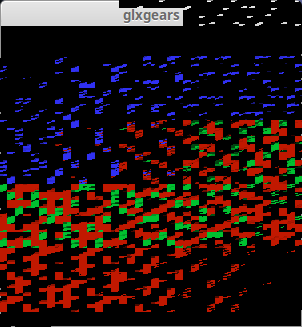
Bir not olması için şunuda söylim açık kaynak sürücüde DRI_PRIME=0 glxgears komutuyla çarkları görüyorum ama DRI_PRIME=1 glxgears dersem çarklar yerine kırmızı yeşil küpler dikdörtgenler vs çıkıyor. Hatta o pencerenin küçültme tam ekran çarpı bölümlerinin olduğu köşede eçiş büçüş siyahi reklere giriyor.

Mesajlar Birleştirildi.
xorg un logunuda vereyim istedim ama forum o uzunluğu kabul etmiyor.

Mesajlar Birleştirildi.
açık kaynak sürücüde
DRI_PRIME=1 glxgears çıktısı
Kod: [Seç]
8043 frames in 5.0 seconds = 1608.580 FPS
8166 frames in 5.0 seconds = 1633.103 FPS
8250 frames in 5.0 seconds = 1649.867 FPS
8174 frames in 5.0 seconds = 1634.718 FPS
8088 frames in 5.0 seconds = 1617.535 FPS
7888 frames in 5.0 seconds = 1577.497 FPS

ekran görüntüsü

« Son Düzenleme: 17 Ocak 2016, 22:06:49 Gönderen: istanbul »