Arkadaşlar merhaba 1.5 saat önce deepin OS'dan linux mint'e geçiş yaptım. Fakat şöyle bir problemim var aynı sorun Deepin OS'da da vardı ekran kartım amd radeon hd 5450 gerekli dosyayı indirdim. Çalıştırdım fakat bir hata verdi o hatayı sizinle paylaşıyorum yardımcı olursanız sevinirim teşekkür ederim iyi günler.
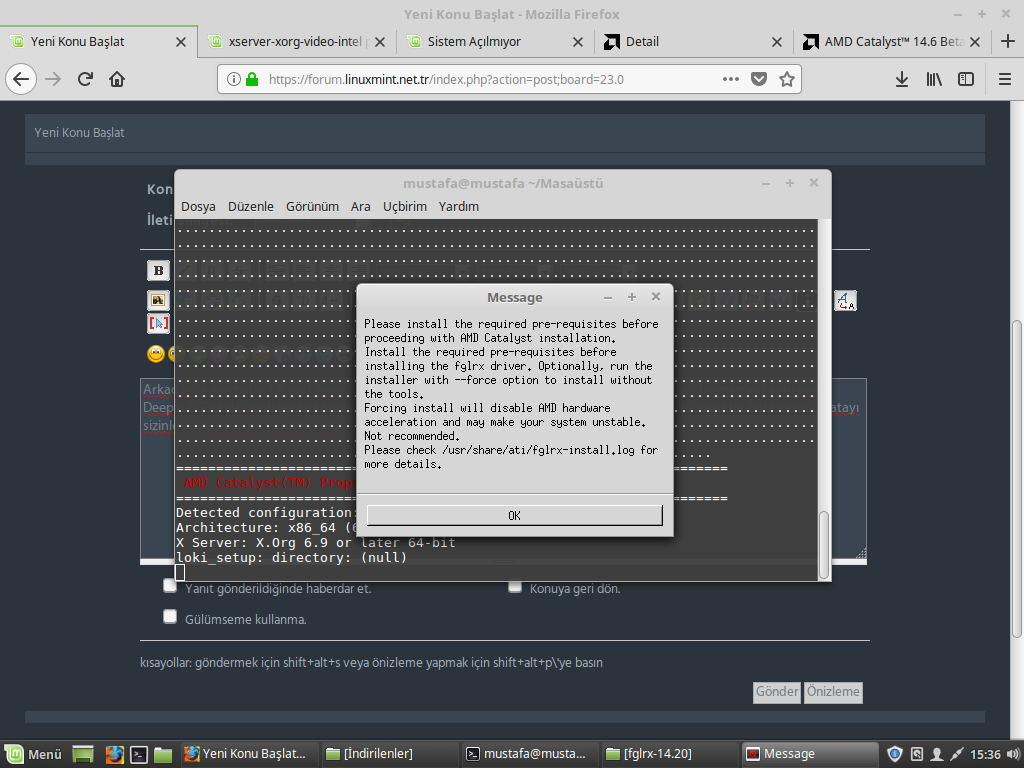
Bu arada kod eklemem gerekiyormuş adminimiz uyardı sağolsun
inxi -SMGxx çıkan sonuç:
System: Host: mustafa Kernel: 4.10.0-38-generic x86_64 (64 bit gcc: 5.4.0)
Desktop: Cinnamon 3.6.6 (Gtk 3.18.9-1ubuntu3.3) dm: lightdm
Distro: Linux Mint 18.3 Sylvia
Machine: Mobo: ASUSTeK model: H61M-PRO v: Rev X.0x
Bios: American Megatrends v: 0408 date: 11/25/2014
Graphics: Card: Advanced Micro Devices [AMD/ATI] Cedar [Radeon HD 5000/6000/7350/8350 Series]
bus-ID: 01:00.0 chip-ID: 1002:68f9
Display Server: X.Org 1.18.4 drivers: ati,radeon (unloaded: fbdev,vesa)
Resolution: 1024x768@60.00hz
GLX Renderer: N/A GLX Version: N/A Direct Rendering: N/A
glxinfo | grep render çıkan sonuç:
X Error of failed request: BadValue (integer parameter out of range for operation)
Major opcode of failed request: 155 (GLX)
Minor opcode of failed request: 24 (X_GLXCreateNewContext)
Value in failed request: 0x0
Serial number of failed request: 34
Current serial number in output stream: 35
lspci | egrep 'VGA|3D|Display' çıkan sonuç:
01:00.0 VGA compatible controller: Advanced Micro Devices, Inc. [AMD/ATI] Cedar [Radeon HD 5000/6000/7350/8350 Series]
xrandr çıkan sonuç:
Screen 0: minimum 320 x 200, current 1024 x 768, maximum 8192 x 8192
HDMI-0 disconnected (normal left inverted right x axis y axis)
DVI-0 disconnected (normal left inverted right x axis y axis)
VGA-0 connected primary 1024x768+0+0 (normal left inverted right x axis y axis) 0mm x 0mm
1024x768 60.00*
800x600 60.32 56.25
848x480 60.00
640x480 59.94
cat /etc/X11/xorg.conf çıkan sonuç:
cat: /etc/X11/xorg.conf: Böyle bir dosya ya da dizin yok
dpkg -l | egrep 'nvidia|bumblebee|primus|prime|virtualgl|fglrx' çıkan sonuç:
rx'
ii fglrx 2:15.201-0ubuntu1 amd64 Video driver for the AMD graphics accelerators
ii fglrx-core 2:15.201.2-0ubuntu0.14.04.1 amd64 Minimal video driver for the AMD graphics accelerators
ii nvidia-prime-applet 1.0.6 all An applet for NVIDIA Prime
Yardımcı olabilirseniz ne mutlu bana linux için windows'u bıraktım pişman durumdayım

Birde arkadaşlar
http://support.amd.com/en-us/kb-articles/Pages/latest-linux-beta-driver.aspx bu siteden beta sürümünü indirdim ve çalıştırdığım zaman şöyle bir hata aldım:
error: Detected X Server version 'XServer _64a' is not supported. Supported versions are X.Org 6.9 or later, up to XServer 1.10 (default:v2:x86_64:lib32:XServer _64a:none:4.10.0-38-generic:)
Installation will not proceed.
Removing temporary directory: fglrx-install.q6gCSy


